Some weeks ago I worked on a fun experiment, trying to see populated areas at night using satellite imagery. I found this dataset from VIIRS (Visible Infrared Imaging Radiometer Suite), which sensor was particularly designed to detect low light levels.
First step was to get the data from the Annual VNL v2.2. dataset.
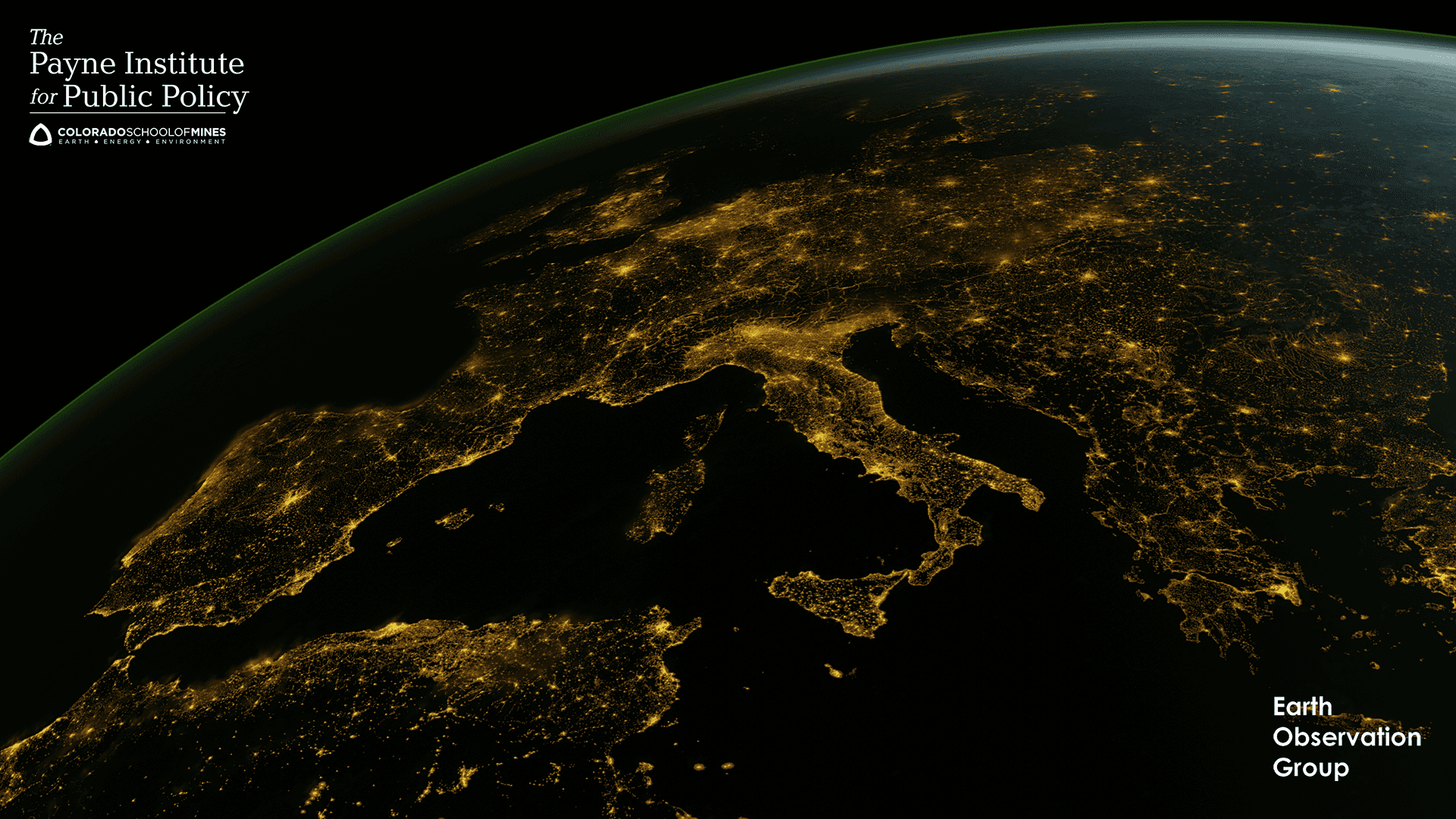
3D rendering of Europe at night using high-resolution Nighttime Light texture as emission source in Blender.
It looks very good when zoomed out, but zoomed in it's a different story. If we clip the image the the Area of Interest (AOI) we want to analyze (in this case, Berlin), we can see the resolution is not very good and the image is very noisy.
Code to clip the AOI
aoi_bbox = (11.016088, 51.062939, 15.334464, 53.700949)
aoi_geom = [box(*aoi_bbox).__geo_interface__]

with rasterio.open(SRC_PATH) as src:
  clipped, clipped_transform = mask(src, aoi_geom, crop=True)
  clipped_meta = src.meta.copy()
  clipped_meta.update({
      "height": clipped.shape[1],
      "width": clipped.shape[2],
      "transform": clipped_transform,
  })
Raw data, clipped to the AOI. Yes, it's very hard to see anything!
We can actually visualize the radiance data using matplotlib.pyplot:
Code to plot the radiance data
with rasterio.open(AOI_CLIPPED) as src:
    data = src.read(1)
    bounds = src.bounds

fig, ax = plt.subplots(figsize=(10, 8))
im = ax.imshow(
    np.log1p(np.clip(data, 0, None)),
    extent=(bounds.left, bounds.right, bounds.bottom, bounds.top),
    cmap="inferno",
)
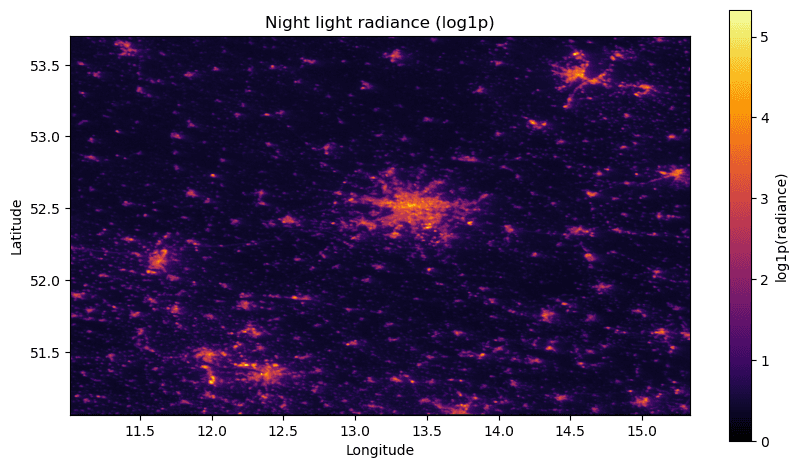
Mapping the radiance data to a logarithmic scale and visualizing it using the inferno colormap.
If we clip the data to an even smaller AOI, around the city center,
we can really see the low resolution of the data.
Bounding box here is (13.4190, 52.3926, 13.5218, 52.5029).
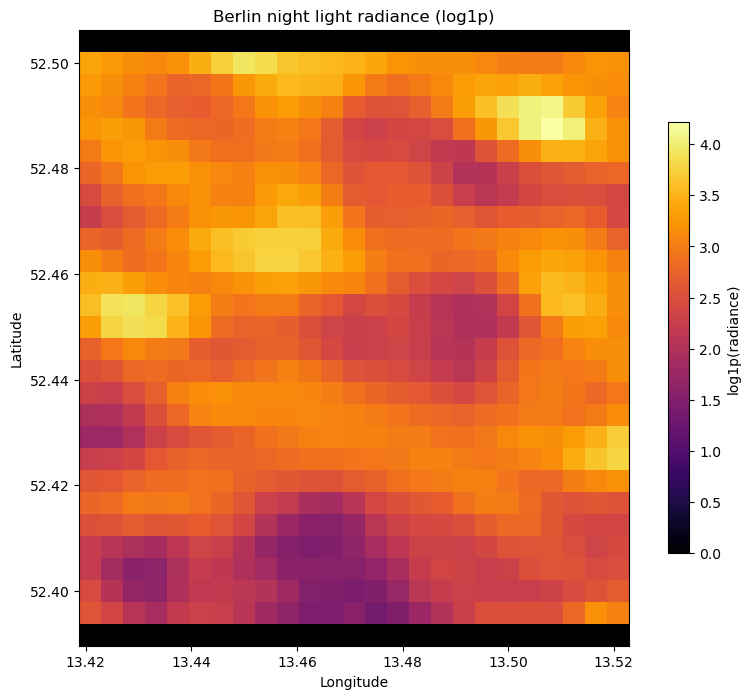
You can't even see streets from here!
About the data
Radiance values in this raster are in nW/cm²/sr
(nanoWatts per square centimeter per steradian) —
VNL v2 annual composite, vcmslcfg variant.
Let's try to de-noise the data as much as possible.
EOG's processing already eliminates the adaptive-background pixels,
but the rest of the tail is still mostly noise + moonlight scatter.
We get rid of everything below NOISE_FLOOR
(default 0.5 nW/cm²/sr for now) before looking at the distribution.
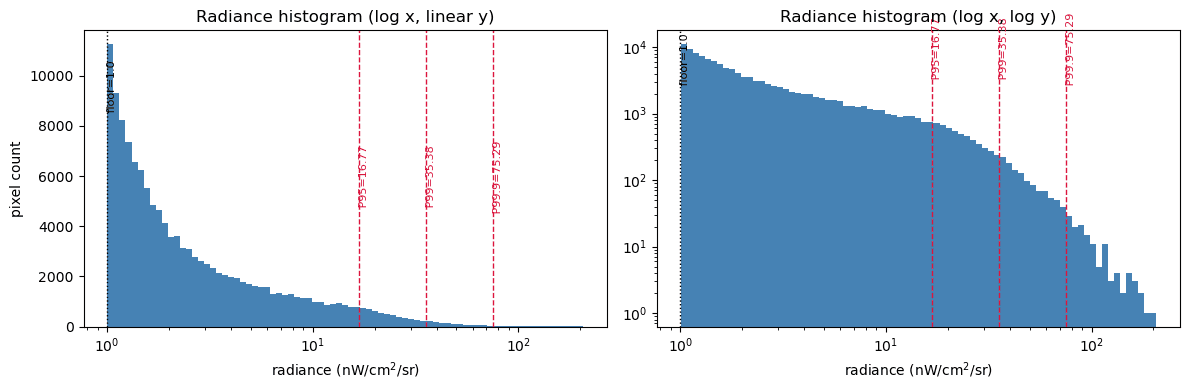
We can plot the hisgtogram of the radiance values to see how the data is distributed (and the percentiles of the distribution):
Pseudo-code to plot the histogram
vals = aoi_data[~np.isnan(aoi_data)] if aoi_nodata is None else aoi_data[aoi_data != aoi_nodata]
# We can now get vals.min(), .max(), .mean(), .std()...
# percentiles with `float(np.percentile(vals, 50))` for P50, etc.

# Radiance is power-law-distributed: use log-spaced bins on log-x so the
# city-scale tail is actually visible alongside the dim-pixel mass.
log_bins = np.logspace(np.log10(vals.min()), np.log10(vals.max()), 80)
fig, axes = plt.subplots(1, 2, figsize=(12, 4))
axes[0].hist(vals, bins=log_bins, color="steelblue")
axes[0].set_xscale("log")

axes[1].hist(vals, bins=log_bins, color="steelblue")
axes[1].set_xscale("log")
axes[1].set_yscale("log")
plt.show()
(Simplified the code above, but you get the idea.)
Another exploration is to do a threshold sensitivity sweep with Otsu's threshold: For each candidate threshold, count how many lit pixels remain and how many connected polygons would be produced. We also compute Otsu's threshold from the same data.
Note: Otsu's method is automatic threshold that maximizes between-class variance for bimodal data (dark background vs. lit clusters). It's a good baseline when we don't have a target lit-area, like in this case.
Code to compute Otsu's threshold and count polygons for each threshold
from rasterio.features import shapes as rio_shapes

def count_polygons(mask_arr, transform):
    n = 0
    for _, val in rio_shapes(mask_arr, transform=transform):
        if val == 1:
            n += 1
    return n

def otsu_threshold(x):
    # Standard 1-D Otsu on a 256-bin histogram
    hist, edges = np.histogram(x, bins=256)
    p = hist / hist.sum()
    omega = np.cumsum(p)
    mu = np.cumsum(p * (edges[:-1] + np.diff(edges) / 2))
    mu_t = mu[-1]
    denom = omega * (1 - omega)
    sigma_b2 = np.where(denom > 0, (mu_t * omega - mu) ** 2 / denom, 0)
    k = np.argmax(sigma_b2)
    return float((edges[k] + edges[k + 1]) / 2)

otsu = otsu_threshold(vals)
print(f"Otsu threshold: {otsu:.3f}")

with rasterio.open(AOI_CLIPPED) as src:
    aoi_transform = src.transform

thresholds = [NOISE_FLOOR, 1.0, 2.0, 5.0, 10.0, stats["P95"], stats["P99"], otsu]
thresholds = sorted(set(round(t, 3) for t in thresholds))

rows = []
for t in thresholds:
    mask_arr = (
        (aoi_data > t)
        & (aoi_data > NOISE_FLOOR)
        & (aoi_data != aoi_nodata)
    ).astype(np.uint8)
    lit_px = int(mask_arr.sum())
    n_polys = count_polygons(mask_arr, aoi_transform)
    rows.append((t, lit_px, lit_px / vals.size * 100, n_polys))

print(f"{'thresh':>8} {'lit_px':>10} {'lit_%':>8} {'n_polys':>8}")
for t, lp, pct, n in rows:
    print(f"{t:>8.3f} {lp:>10,} {pct:>7.2f}% {n:>8}")

# we then use matplotlib to plot `rows`
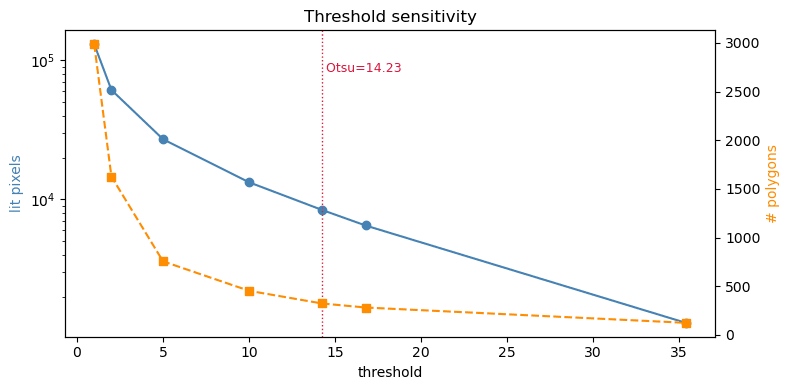
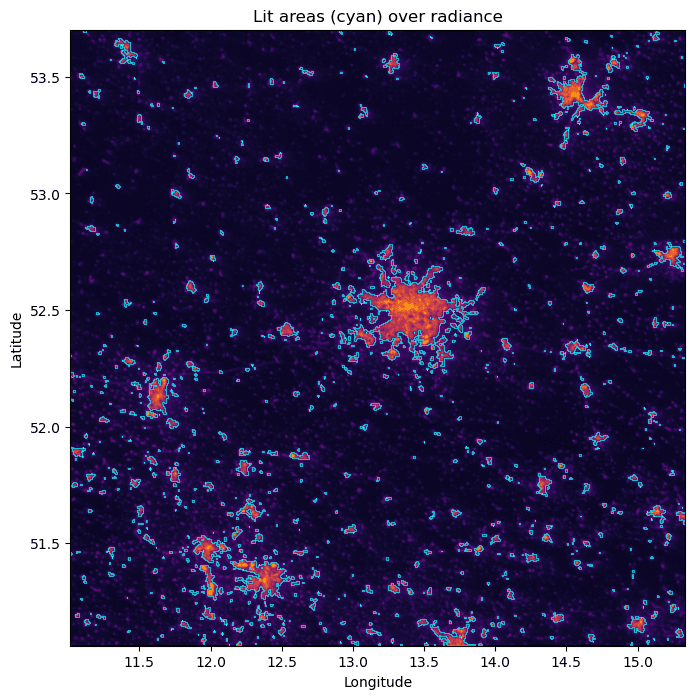
After some experimentation, we can see that Otsu's threshold might be a bit too high for our AOI, and we might want to use a lower threshold to get more polygons, so I'll try 4.0, around the start of the tail of the distribution. Let's polygonize the AOI data using this threshold and visualize the results. We can save the polygons to a gpkg file and visualize it in QGIS or any other GIS software.
Code to polygonize the AOI data using the 4.0 threshold
def polygonize_night_lights(raster_path, threshold=1.0, output_path=LIT_AREAS, noise_floor=0.0):
  """Convert lit pixels (radiance > max(threshold, noise_floor)) to polygons.

  threshold and noise_floor are in nW/cm^2/sr.
  """
  features = []
  with rasterio.open(raster_path) as src:
      data = src.read(1)
      nodata = src.nodata
      cut = max(threshold, noise_floor)
      mask_arr = np.where(
          (data > cut) & (data != nodata),
          1,
          0,
      ).astype(np.uint8)
      for geom, val in shapes(mask_arr, transform=src.transform):
          if val == 1:
              features.append({"geometry": shape(geom), "value": val})
      crs = src.crs

  gdf = gpd.GeoDataFrame(features, crs=crs)
  gdf = gdf.dissolve()
  gdf.to_file(output_path, driver="GPKG")
  print(f"Saved {len(gdf)} polygons to {output_path}")
  return gdf

gdf = polygonize_night_lights(AOI_CLIPPED, threshold=4.0)
gdf.head()
And we can now plot the polygons over the raster data to visualize the results.
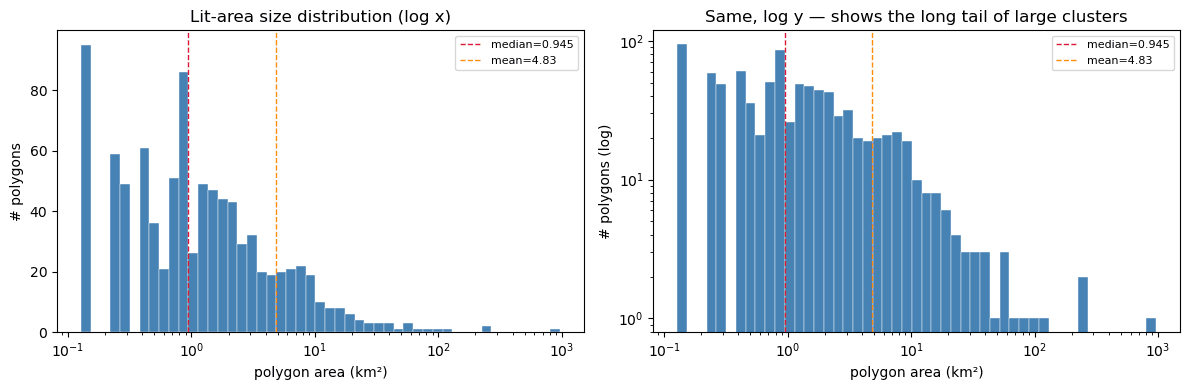
The code from before (polygonize_night_lights) calls gdf.dissolve(),
which packs all 906 lit-area parts into a single MultiPolygon row.
We explode() it into 906 individual polygons, reproject from EPSG:4326 to
EPSG:3035 (ETRS89 LAEA Europe — equal-area), and compute each polygon's area in km².
Areas are heavily right-skewed: a few large urban blobs (Berlin, Magdeburg, Cottbus) and many tiny single-pixel clusters. We can plot this using log-spaced bins on a log x axis so the shape is visible across the whole size range.
Code to compute polygon stats
# Explode the dissolved multipolygon back into individual polygons.
polys = gdf.explode(index_parts=False).reset_index(drop=True)

# Reproject to ETRS89 LAEA Europe (EPSG:3035) for equal-area calculation.
polys_eq = polys.to_crs("EPSG:3035")
polys["area_km2"] = polys_eq.geometry.area / 1e6

n = len(polys)
areas = polys["area_km2"].to_numpy()
print(f"# polygons: {n}")
print(f"min:    {areas.min():.4f} km²")
print(f"max:    {areas.max():.2f} km²")
print(f"mean:   {areas.mean():.2f} km²")
print(f"median: {np.median(areas):.4f} km²")
print(f"total:  {areas.sum():.1f} km² lit")
for q in [50, 75, 90, 95, 99]:
    print(f"P{q}:    {np.percentile(areas, q):.3f} km²")

print("\nTop 10 largest polygons:")
print(polys.nlargest(10, "area_km2")[["area_km2"]].to_string())
Summary statistics of the polygons
| Metric | Value |
|---|---|
| Polygons | 906 |
| Min | 0.1277 km² |
| Max | 963.37 km² |
| Mean | 4.83 km² |
| Median | 0.9455 km² |
| Total | 4373.0 km² lit |
| P50 | 0.945 km² |
| P75 | 2.508 km² |
| P90 | 7.443 km² |
| P95 | 12.254 km² |
| P99 | 56.707 km² |
Top 10 largest polygons (in km²)
| Polygon | Area (km²) |
|---|---|
| 508 | 963.369265 |
| 300 | 259.946248 |
| 804 | 240.895565 |
| 145 | 115.464188 |
| 223 | 105.468932 |
| 551 | 87.893229 |
| 882 | 67.469343 |
| 505 | 58.130556 |
| 895 | 58.060506 |
| 211 | 57.343108 |
Now, let's try dropping everything below the mean (area_km2 > mean).
This keeps roughly the top ~12% of polygons (the ones in the long tail)
and discards the noise/single-pixel cluster mass.
We then replot the radiance map with only the surviving polygons outlined.
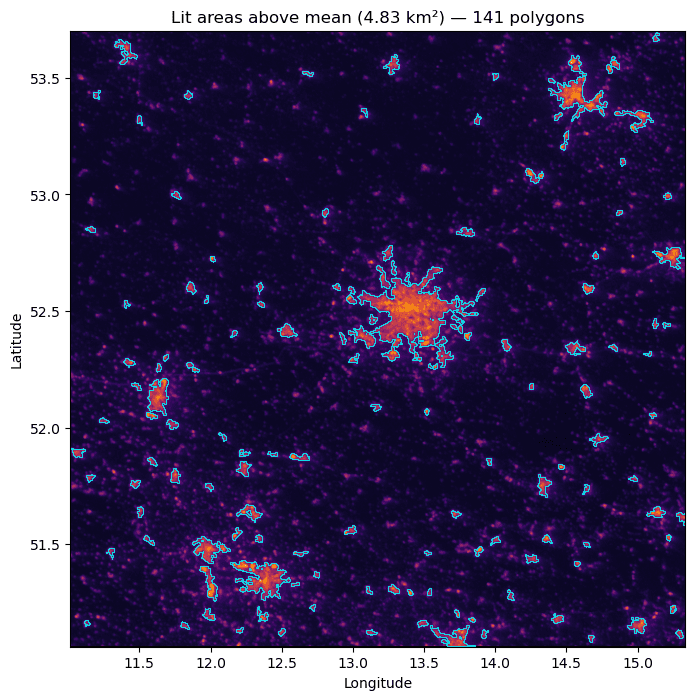
Radiance map with only the bigger polygons outlined.
Switching to a different dataset.
This has been fun but could already see a few steps back in the process
that this data is not very useful for city-scale analysis,
and that the resolution is too low to see streets or buildings.
Let's try a different dataset, in this case
Sentinel-2 Night-Time Acquisitions (Copernicus).
on CDSE (s3://eodata/Sentinel-2/MSI/S2MSI_NIGHT/).
There's no coverage for the whole world so we switch AOI to Madrid, Spain.
The one we'll be using is Madrid, 2025-12-22: S2A_OPER_PRD_R058_V20251222T221730_20251222T221745.
The units are also different (calibrated spectral radiance, W·m⁻²·sr⁻¹·µm⁻¹, float),
and the processing is different as well.
Having the date of the acquisition is important because we want to avoid moonlight scatter, which can be a big source of noise in night-time imagery. This is not in the metadata, but we can use Lunation 0 to calculate it:
Code to calculate the lunation number/illumination from the moon
from datetime import datetime, timezone
import math

ACQ_TIME = datetime(2025, 12, 22, 22, 17, 30, tzinfo=timezone.utc)
_ref_new_moon = datetime(2000, 1, 6, 18, 14, tzinfo=timezone.utc)
_synodic = 29.530588853
_age = ((ACQ_TIME - _ref_new_moon).total_seconds() / 86400.0) % _synodic
_illum = (1 - math.cos(2 * math.pi * _age / _synodic)) / 2
print(f"Moon age:    {_age:.2f} days post-new")
print(f"Illuminated: {_illum * 100:.1f}%  (lower → less moonlight scatter, more emitter-only signal)")
Out:
Moon age:    2.85 days post-new
Illuminated: 8.9%  (lower → less moonlight scatter, more emitter-only signal)
The zip downloaded from S3 contains 13 single-band orthorectified GeoTIFFs
(B01-B12, B8A) in EPSG:4326.
We read them directly through GDAL's /vsizip/ driver, no extraction needed.
B04 (red, ~665 nm) is a reasonable single band for visualizing lights.
Each file is huge (24970×12427 pixels)
so I won't load them here directly like I did with VIIRS raw data, but here's a fun preview:
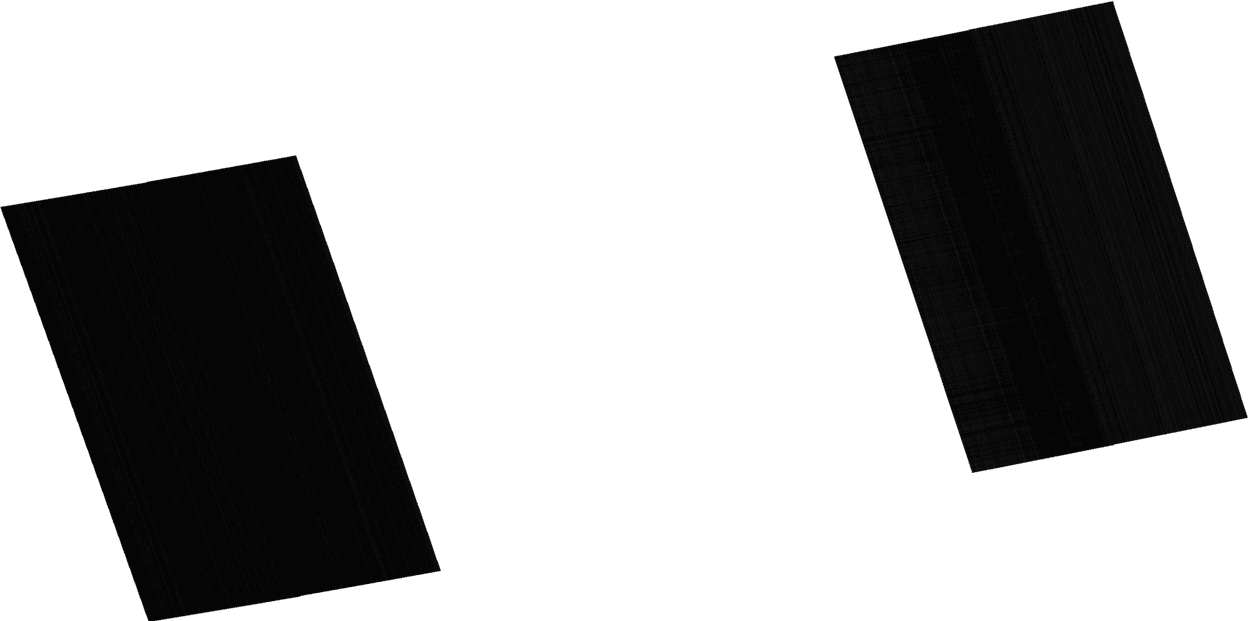
Flag of Meerhout, or a night-time view of Madrid, not sure.
We can recover something like a VIIRS view by:
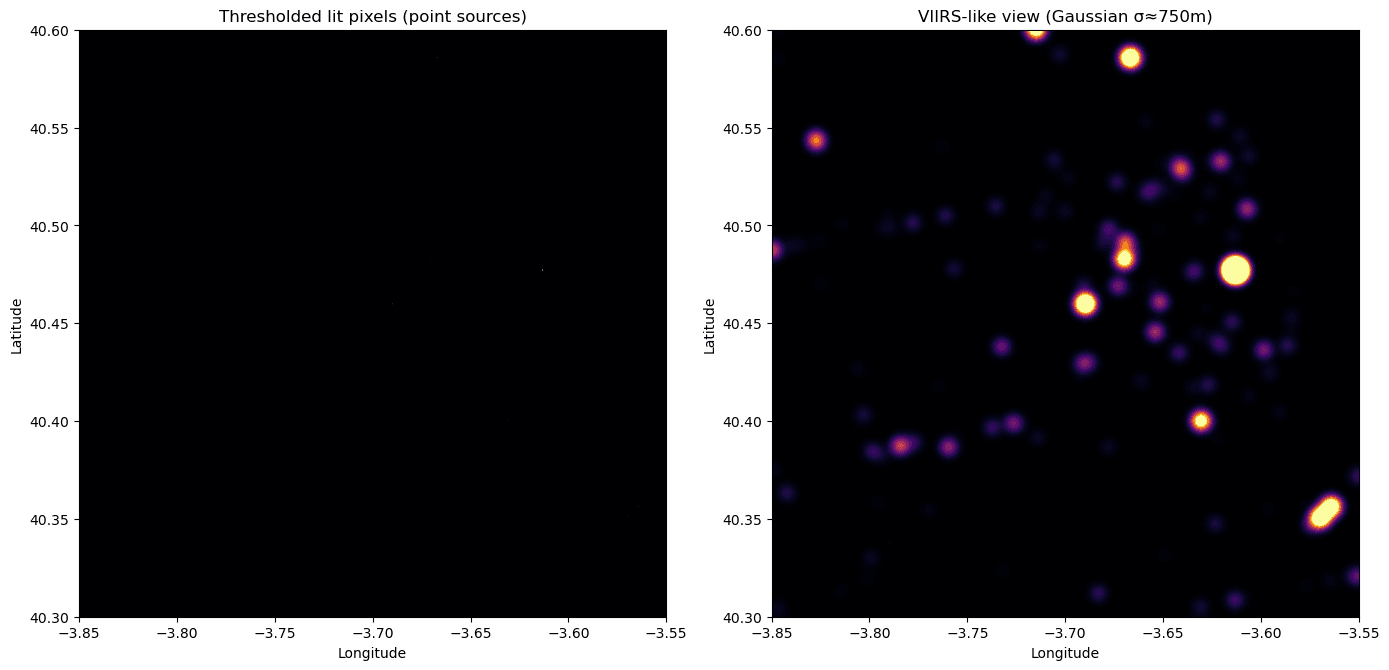
- Thresholding each band above its scan-line noise floor (B12 > 0.10, B08/B03 > 0.50), keeping only true emitters.
- Summing the three bands as a normalized "lit signal".
- Convolving with a Gaussian of σ = 750 m / 10 m / 2.355 ≈ 32 px (matches VIIRS DNB FWHM).
The result shows central Madrid, Barajas airport, and satellite towns (Getafe, Rivas?) as fused glowing patches, much closer to the VIIRS view we started this post with.
The Sentinel-2 acquisition is a MultiPolygon of two tilted strips: the two black strips you see in the preview above. The west strip covers Salamanca / Sierra de Gredos (sparsely populated, dim signal). The east strip contains Madrid, which is the interesting part, so we restrict everything to the east polygon.
We fetch the STAC item, take geometry.coordinates[1] (east strip),
use its bbox for cropping VIIRS and Sentinel-2, and use the polygon as a
footprint mask so the gap area shows as nan rather than "black = no light".
We also apply a local column-median destripe to suppress the documented Sen2VM detector-overlap stripe noise before thresholding, so PSF-blurring doesn't smear stripe artifacts into fake glowing columns.
Code to destripe the Sentinel-2 data
import json
import urllib.request
from rasterio.windows import from_bounds
from rasterio.vrt import WarpedVRT
from rasterio.enums import Resampling
from rasterio.features import geometry_mask
from scipy.ndimage import gaussian_filter
from shapely.geometry import shape as shp_shape

STAC_ITEM_URL = (
    "https://stac.dataspace.copernicus.eu/v1/collections/"
    "sentinel-2-night-time-acquisitions/items/"
    "S2A_OPER_PRD_R058_V20251222T221730_20251222T221745"
)
stac_item = json.loads(urllib.request.urlopen(STAC_ITEM_URL).read())

east_polygon = {
    "type": "Polygon",
    "coordinates": stac_item["geometry"]["coordinates"][1],
}
east_shape = shp_shape(east_polygon)
EAST_BBOX = east_shape.bounds  # (minx, miny, maxx, maxy)
print(f"East strip bbox: ({EAST_BBOX[0]:.4f}, {EAST_BBOX[1]:.4f}, {EAST_BBOX[2]:.4f}, {EAST_BBOX[3]:.4f})")

DECIM = 10  # 10m → 100m pixels
S2_REF_URL = band_vsi("B03")

def read_decim_on_ref(band, decim=DECIM):
    with rasterio.open(S2_REF_URL) as ref, rasterio.open(band_vsi(band)) as src:
        with WarpedVRT(
            src,
            crs=ref.crs,
            transform=ref.transform,
            width=ref.width,
            height=ref.height,
            resampling=Resampling.bilinear,
        ) as vrt:
            win = from_bounds(*EAST_BBOX, transform=vrt.transform)
            out_shape = (int(win.height // decim), int(win.width // decim))
            d = vrt.read(1, window=win, out_shape=out_shape,
                         out_dtype=np.float32, resampling=Resampling.average)
            nd = vrt.nodata
            win_transform = vrt.window_transform(win)
            scale_x = win.width / out_shape[1]
            scale_y = win.height / out_shape[0]
            decim_transform = win_transform * win_transform.scale(scale_x, scale_y)
    valid = (d != nd) & np.isfinite(d) & (np.abs(d) < 1000)
    return np.where(valid, d, 0.0), decim_transform

print("Reading decimated Sentinel-2 bands over east strip...")
b12_e, s2_grid_transform = read_decim_on_ref("B12")
b08_e, _ = read_decim_on_ref("B08")
b03_e, _ = read_decim_on_ref("B03")
print(f"Sentinel-2 decimated shape: {b03_e.shape}  (~100m pixels)")

def local_column_destripe(arr, mask, height=51):
    """Subtract a moving column-median computed over `height` rows.

    The Sen2VM detector-overlap stripes run along the orbit ground track
    (~15° off vertical here). A tall narrow window captures the local
    per-column stripe offset without needing to rotate into orbit coordinates.
    """
    from numpy.lib.stride_tricks import sliding_window_view
    arr_m = np.where(mask, arr, np.nan).astype(np.float32)
    H = arr_m.shape[0]
    half = height // 2
    bg = np.full_like(arr_m, np.nan)
    if H >= height:
        for j in range(arr_m.shape[1]):
            padded = np.concatenate([np.full(half, np.nan), arr_m[:, j], np.full(half, np.nan)])
            windows = sliding_window_view(padded, height)
            with np.errstate(all="ignore"):
                bg[:, j] = np.nanmedian(windows, axis=1)
    bg = np.where(np.isnan(bg), 0.0, bg)
    return np.where(mask, arr - bg, 0.0)

footprint_mask = geometry_mask(
    [east_polygon],
    out_shape=b03_e.shape,
    transform=s2_grid_transform,
    invert=True,  # True inside the polygon
)
print(f"Polygon covers {100 * footprint_mask.sum() / footprint_mask.size:.1f}% of bbox")

print("Destriping (Sen2VM detector-overlap noise)...")
b12_e = local_column_destripe(b12_e, footprint_mask, height=51)
b08_e = local_column_destripe(b08_e, footprint_mask, height=51)
b03_e = local_column_destripe(b03_e, footprint_mask, height=51)

lit_e = (
    np.where(b12_e > 0.020, b12_e, 0.0) / 0.1
    + np.where(b08_e > 0.060, b08_e, 0.0) / 0.5
    + np.where(b03_e > 0.100, b03_e, 0.0) / 0.5
)
lit_e = np.where(footprint_mask, lit_e, 0.0)
n_lit = int((lit_e > 0).sum())
print(f"Lit pixels in east strip: {n_lit:,} / {int(footprint_mask.sum()):,} ({100 * n_lit / max(footprint_mask.sum(), 1):.3f}% of swath)")

sigma_px_e = 750 / 100 / 2.355
s2_blurred_e = gaussian_filter(lit_e, sigma=sigma_px_e)
s2_blurred_e = np.where(footprint_mask, s2_blurred_e, np.nan)
Finally, plotting the blurred lit signal over the east strip of Madrid, we can see the city lights and surrounding areas.
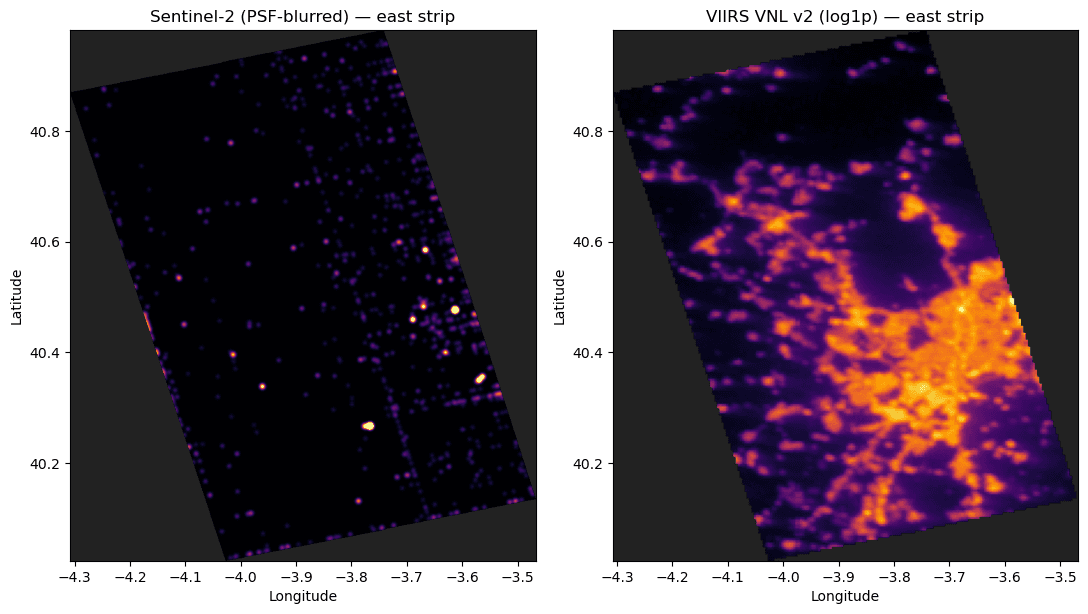
Unfortunately in this case the Sentinel-2 data is not as clean as VIIRS (because of the type of sensor, most likely), and we can see a lot of noise in the image. The next step would be to try to clean the data and extract the lit areas, but we can already see that even though the resolution is higher, it's still not useful for city-scale analysis at night.
This was a fun experiment, and I hope you enjoyed reading about it!